

Introduction
Craving a word-guessing challenge like Wordle? In this tutorial, we’ll create a Python-based Wordle game using the Turtle graphics library. You’ll build a 5×6 grid where you type 5-letter words, get color-coded feedback (green, yellow, gray), and aim to guess a hidden word in six tries. With difficulty levels, high scores, and downloadable code, this project is perfect for Python beginners and enthusiasts. Let’s get started!
What You’ll Need
- Python 3: Ensure Python 3.13 or later is installed (download here).
- Text Editor: Use VS Code, Notepad, or any editor.
- wordle_words.txt: Download the word list file provided below.
- Optional: Install gTTS and playsound for voice feedback (pip install gTTS playsound).
Step 1: Setting Up the Word List
Download the wordle_words.txt file (linked below) and place it in the same directory as your Python script. This file contains 30 5-letter words used for valid guesses and selecting the hidden target word.
Step 2: The Code
Below is the complete Python code for the Wordle game. Save it as wordle_game.py in the same directory as wordle_words.txt.
import random
import turtle
from tkinter import *
from tkinter import messagebox, simpledialog
import json
import os

# Setup Turtle screen
screen = turtle.Screen()
screen.setup(1000, 1000)
screen.title("Wordle Game - FunWithAI.in")
turtle.speed(0)
turtle.hideturtle()
screen.tracer(0, 0)
screen.bgcolor('#1a1a1a')
turtle.color('white')

# Game state
gs = 0
state = [[-1] * 5 for _ in range(6)]
typed_word = [""] * 5
score = 0
difficulty = None
high_scores = {"Beginner": 0, "Easy": 0, "Medium": 0, "Hard": 0}
words = []
orig_words = []
target_word = ""
current_pos = 0

# Load words
try:
    with open('wordle_words.txt', 'r') as f:
        orig_words = [w.strip() for w in f if len(w.strip()) == 5]
    if not orig_words:
        raise ValueError("wordle_words.txt is empty")
except FileNotFoundError:
    messagebox.showerror("Error", "wordle_words.txt not found! Please create it with 5-letter words.")
    exit()
except ValueError as e:
    messagebox.showerror("Error", str(e))
    exit()

# Load high scores
if os.path.exists('high_scores.json'):
    with open('high_scores.json', 'r') as f:
        high_scores = json.load(f)

def save_scores():
    with open('high_scores.json', 'w') as f:
        json.dump(high_scores, f)

def draw_square(coord, s, fc='#333333', anim=False):
    turtle.up()
    x, y = coord
    turtle.goto(x - s / 2, y - s / 2)
    turtle.seth(0)
    turtle.down()
    turtle.fillcolor(fc)
    turtle.begin_fill()
    for _ in range(4):
        turtle.fd(s)
        turtle.left(90)
        if anim:
            screen.update()
            turtle.delay(5)
    turtle.end_fill()

def get_coord(i, j):
    return -200 + 100 * j, 300 - 100 * i

def draw_board():
    turtle.pencolor('#555555')
    for i in range(6):
        for j in range(5):
            draw_square(get_coord(i, j), 80, '#333333')

def display_word(row):
    turtle.up()
    turtle.color('white')
    for i in range(5):
        x, y = get_coord(row, i)
        turtle.goto(x, y - 23)
        turtle.write(typed_word[i].upper() if i < len(typed_word) and typed_word[i] else ' ', align='center', font=('Arial', 40, 'bold'))

def update_cell(i, j, anim=False):
    x, y = get_coord(i, j)
    turtle.pencolor('#555555')
    fc = '#333333' if state[i][j] == -1 else '#666666' if state[i][j] == 0 else '#FFD700' if state[i][j] == 1 else '#32CD32'
    draw_square((x, y), 80, fc, anim)
    turtle.up()
    turtle.color('white')
    turtle.goto(x, y - 23)
    turtle.write(typed_word[j].upper() if j < len(typed_word) and typed_word[j] and i == gs else ' ', align='center', font=('Arial', 40, 'bold'))
    screen.update()

def type_letter(letter):
    global current_pos, typed_word
    if letter.isalpha() and current_pos < 5:
        typed_word[current_pos] = letter.lower()
        display_word(gs)
        update_cell(gs, current_pos)
        current_pos += 1
        print(f"Typed letter: {letter}, word: {''.join(typed_word)}")
    elif letter == 'BackSpace' and current_pos > 0:
        current_pos -= 1
        typed_word[current_pos] = ""
        display_word(gs)
        update_cell(gs, current_pos)
        print(f"Backspace, word: {''.join(typed_word)}")
    elif letter == 'Return':
        submit()

def submit():
    global gs, state, typed_word, current_pos, score
    word = ''.join(typed_word).lower()
    if len(word) != 5 or word not in orig_words:
        messagebox.showwarning("Invalid", "Please enter a valid 5-letter word!")
        return

    for i in range(5):
        if word[i] == target_word[i]:
            state[gs][i] = 2  # Green
        elif word[i] in target_word:
            state[gs][i] = 1  # Yellow
        else:
            state[gs][i] = 0  # Gray
        update_cell(gs, i, anim=True)

    if word == target_word:
        score += 1000 // (gs + 1) * (4 if difficulty == "Hard" else 3 if difficulty == "Medium" else 2 if difficulty == "Easy" else 1)
        messagebox.showinfo("Victory!", f"Congratulations!\nScore: {score}")
        high_scores[difficulty] = max(high_scores[difficulty], score)
        save_scores()
        turtle.bye()
        return

    gs += 1
    if gs < 6:
        typed_word = [""] * 5
        current_pos = 0
        for i in range(5):
            update_cell(gs, i)
        display_word(gs)
        print(f"Advanced to row {gs}, target word: {target_word}")
    else:
        messagebox.showinfo("Game Over", f"Out of guesses! The word was {target_word.upper()}\nScore: {score}")
        high_scores[difficulty] = max(high_scores[difficulty], score)
        save_scores()
        turtle.bye()

def hint():
    if difficulty in ["Medium", "Hard"]:
        messagebox.showinfo("Hint", "Hints disabled in Medium and Hard modes!")
        return
    remaining_words = [w for w in words if all(w[i] == typed_word[i] or typed_word[i] == '' for i in range(5))]
    if remaining_words:
        hint_word = random.choice(remaining_words)
        messagebox.showinfo("Hint", f"Try: {hint_word.upper()}")

def reset():
    global gs, state, typed_word, current_pos, score, target_word, words, w
    gs = 0
    state = [[-1] * 5 for _ in range(6)]
    typed_word = [""] * 5
    current_pos = 0
    score = 0
    words = orig_words[:] if difficulty in ["Beginner", "Easy"] else random.sample(orig_words, max(1, len(orig_words)//2)) if difficulty == "Medium" else random.sample(orig_words, max(1, len(orig_words)//4))
    target_word = random.choice(words)
    w = ""
    turtle.clear()
    draw_board()
    for i in range(6):
        for j in range(5):
            update_cell(i, j)
    display_word(gs)
    display_instructions()
    screen.update()
    print("Reset game, target word:", target_word)

def set_difficulty(diff=None):
    global difficulty, words, target_word
    if diff is None:
        diff = simpledialog.askstring("Difficulty", "Enter Beginner, Easy, Medium, or Hard:", initialvalue="Beginner")
    if diff in ["Beginner", "Easy", "Medium", "Hard"]:
        difficulty = diff
        reset()
    else:
        messagebox.showwarning("Invalid", "Please choose Beginner, Easy, Medium, or Hard")
        set_difficulty()

def display_instructions():
    turtle.up()
    turtle.goto(0, -450)
    turtle.color('white')
    turtle.write("Type a word and press 'Enter' | 'h': hint | 'F5': reset | 'F6': difficulty", align='center', font=('Arial', 16, 'normal'))

def show_welcome():
    messagebox.showinfo("Wordle Game",
        "Type a 5-letter word and press 'Enter'\n"
        "Green: Correct letter, right spot\n"
        "Yellow: Correct letter, wrong spot\n"
        "Gray: Letter not in word\n"
        "'h': hint (Beginner/Easy)\n"
        "'F5': reset\n"
        "'F6': difficulty\n"
        "Goal: Guess the word in 6 tries!")
    set_difficulty()

# Initialize game
turtle.clear()
draw_board()
for i in range(6):
    for j in range(5):
        update_cell(i, j)
display_instructions()
show_welcome()
screen.update()

# Bind controls
screen.onkey(lambda: type_letter('a'), 'a')
screen.onkey(lambda: type_letter('b'), 'b')
screen.onkey(lambda: type_letter('c'), 'c')
screen.onkey(lambda: type_letter('d'), 'd')
screen.onkey(lambda: type_letter('e'), 'e')
screen.onkey(lambda: type_letter('f'), 'f')
screen.onkey(lambda: type_letter('g'), 'g')
screen.onkey(lambda: type_letter('i'), 'i')
screen.onkey(lambda: type_letter('j'), 'j')
screen.onkey(lambda: type_letter('k'), 'k')
screen.onkey(lambda: type_letter('l'), 'l')
screen.onkey(lambda: type_letter('m'), 'm')
screen.onkey(lambda: type_letter('n'), 'n')
screen.onkey(lambda: type_letter('o'), 'o')
screen.onkey(lambda: type_letter('p'), 'p')
screen.onkey(lambda: type_letter('q'), 'q')
screen.onkey(lambda: type_letter('r'), 'r')
screen.onkey(lambda: type_letter('s'), 's')
screen.onkey(lambda: type_letter('t'), 't')
screen.onkey(lambda: type_letter('u'), 'u')
screen.onkey(lambda: type_letter('v'), 'v')
screen.onkey(lambda: type_letter('w'), 'w')
screen.onkey(lambda: type_letter('x'), 'x')
screen.onkey(lambda: type_letter('y'), 'y')
screen.onkey(lambda: type_letter('z'), 'z')
screen.onkey(lambda: type_letter('BackSpace'), 'BackSpace')
screen.onkey(lambda: type_letter('Return'), 'Return')
screen.onkey(hint, 'h')
screen.onkey(reset, 'F5')
screen.onkey(set_difficulty, 'F6')
screen.listen()
screen.mainloop()
Step 3: How to Play
- Run the Game: Save the code as wordle_game.py, place wordle_words.txt in the same directory, and run.
- Start: A 5×6 grid appears, empty, with instructions at the bottom: “Type a word and press ‘Enter’ | ‘h’: hint | ‘F5’: reset | ‘F6’: difficulty”. A welcome popup explains the rules, followed by a difficulty prompt (enter “Beginner”).
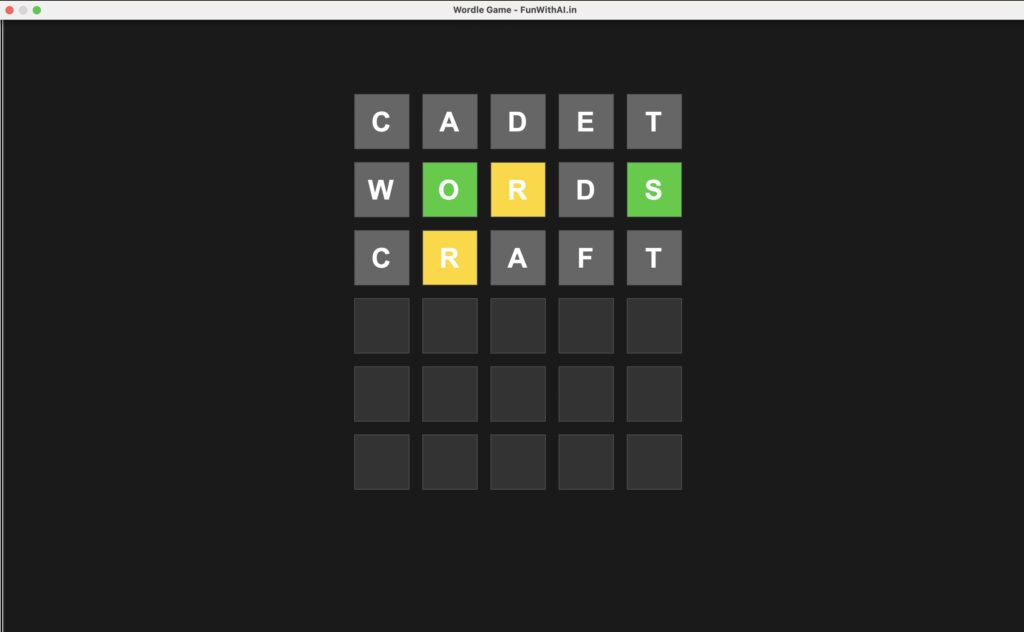
- Guess a Word: Type a 5-letter word (e.g., “CRAFT”) using your keyboard. Letters appear in the first row as you type. Use Backspace to correct mistakes.
- Submit: Press Enter. The game colors the cells:
- Green (#32CD32): Correct letter, right position.
- Yellow (#FFD700): Correct letter, wrong position.
- Gray (#666666): Letter not in the word.
- Example: If the target is “GRAPE” and you type “CRAFT”, C/R/F/T turn gray, A turns yellow.
- Continue: The next row activates. Type another word, up to six tries.
- Win/Lose: Guess the word to win (score based on tries and difficulty), or lose after six tries (target word revealed).
- Controls:
- h: Get a hint (Beginner/Easy only).
- F5: Reset the game.
- F6: Change difficulty (Beginner, Easy, Medium, Hard).
- Step 4: Understanding the Code
- Turtle Graphics: Draws a 5×6 grid with 80×80 pixel cells, centered from (-200, 300) to (300, -200).
- Game Logic: Selects a random target word from wordle_words.txt. Compares each guess to it, setting cell states (2=green, 1=yellow, 0=gray).
- Input Handling: Physical keyboard input adds letters to the current row, with Backspace and Enter for editing and submitting.
- Difficulty: Beginner/Easy use the full word list with hints; Medium/Hard use smaller lists without hints.
- Scoring: Points = 1000/(tries+1) * (Beginner: 1x, Easy: 2x, Medium: 3x, Hard: 4x). High scores are saved to high_scores.json.
- Step 5: Customize and Extend
- Add Words: Edit wordle_words.txt to include more 5-letter words.
- Visuals: Modify colors in update_cell (e.g., #FFD700 for yellow) or adjust grid size in draw_square.
- Features: Add a timer, sound effects (uncomment gTTS code), or an on-screen keyboard for mouse input.
- Difficulty: Adjust word list sizes in reset for custom challenges.
- Download Resources
- wordle_game.py (copy and download the code from above.)
- wordle_words.txt (download here).
Conclusion
You’ve created a downloadable Wordle game with Python and Turtle! This project teaches graphics, input handling, and game logic while offering a fun challenge. Share your high scores or custom versions in the comments on FunWithAI.in. Want more Python projects? Happy coding!
