

“Programming is not about what a language is, but what you do with it. Python makes it simple to create fun projects that build real skills.” – Guido van Rossum, Python’s creator.
I remember my school days in Bokaro, Jharkhand in 2000. Coding felt overwhelming amid exams. C++ was tough back then. Python changes that now. I started with Turtle drawings of our Indian flag. It sparked joy. These projects help Class 10 students score well in computer science. They fix logic bugs. Now I share them on funwithai.in. You can too.
These Python projects are specially designed for Class 10 CBSE students.
Each project includes:
- Simple code (beginner-friendly)
- Output example
- What you’ll learn (important for exams)
- Project explanation (for viva)

Summary
| Project | Difficulty | Time | Concepts |
|---|---|---|---|
| Indian Flag (Turtle) | Beginner | 25 mins | Turtle, graphics, loops |
| Tic-Tac-Toe | Beginner | 40 mins | Lists, conditions, loops |
| Quiz Game (Indian States) | Beginner | 30 mins | Dictionary, loops |
| Number Guessing Game | Beginner | 25 mins | Random, loops |
| Mad Libs Generator | Beginner | 15 mins | Strings, input |
| Rock Paper Scissors | Beginner | 20 mins | Conditions, random |
| Simple Calculator | Beginner | 20 mins | Functions, operators |
| Fibonacci Generator | Beginner | 15 mins | Loops, variables |
| Prime Number Checker | Beginner | 20 mins | Math logic, loops |
| Password Generator | Beginner | 25 mins | Random, strings |
Installing Python IDE for Students
Thonny is the best free IDE for Class 10 students. It is simple. It has debugger. It shows variables step-by-step. IDLE works too. It comes with Python. VS Code is advanced. Use Thonny first.
You can also use Google Colab if you don’t want to install Python.
Why Thonny?
Beginners love it. No setup hassle. Turtle runs easy. Debugs errors clearly. Free download from thonny.org.
Steps to Install Thonny (Windows)
- Go to https://thonny.org.
- Click Windows installer.
- Run .exe file.
- Choose “Install for me only”.
- Click Next till done.
- Open Thonny.
Python comes bundled. No extra install.
IDLE: What Teachers Use
Every Python install includes IDLE. Open it from Start menu after Python setup.
Quick IDLE Start:
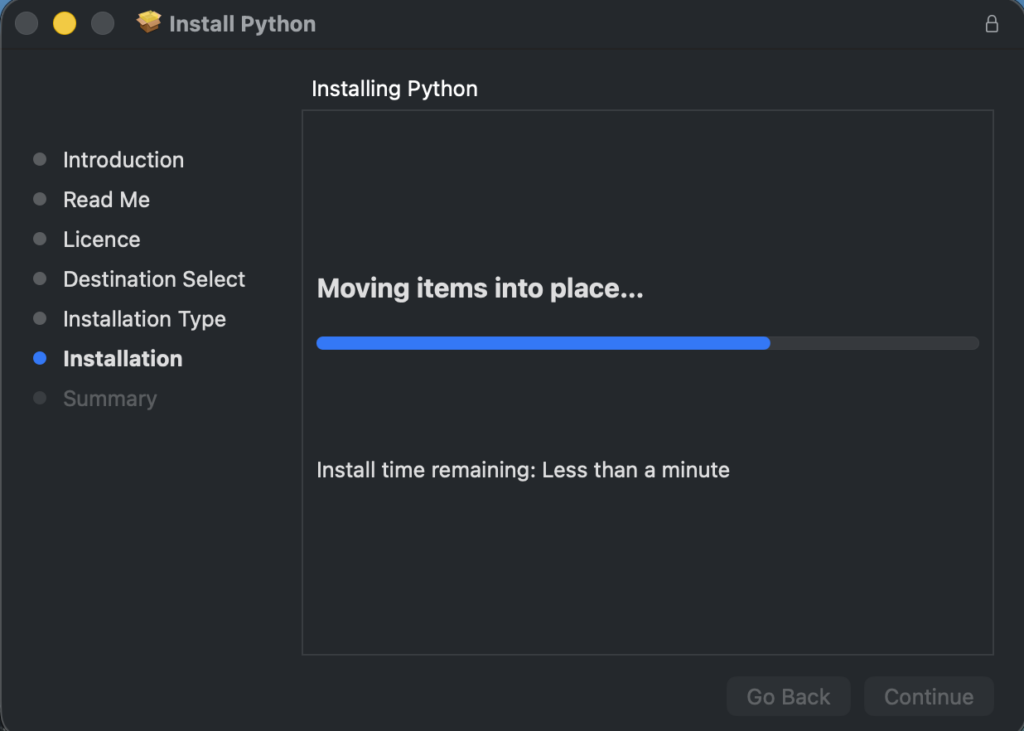
- Install Python from python.org (check “Add Python to PATH”)
- Search “IDLE” in Windows Start
- Click the IDLE icon
- See the >>> shell ready
Now, do this!
- File → New File
- Paste example codes from below
- Save the file
- F5 or Run → Run Module
- Watch your creation in popup window!
Screenshot description: IDLE shell with >>> prompt, File→New menu open, turtle flag drawing in separate graphics window.
Why teachers love IDLE: Simple interface. No confusion. Console shows errors clearly. Ctrl+C stops infinite loops. Students run projects instantly.
Pro tip: Keep both IDLE (for school) + Thonny (for debugging at home). Same Python files work everywhere.
1. Draw the Indian Flag with Turtle
What you’ll learn:
- Turtle graphics basics
- Drawing shapes using loops
- Working with coordinates and colors
Time Required:
- 20–25 minutes
Turtle teaches graphics basics. Class 10 students love patriotic projects. This builds drawing logic. It uses colors and shapes. Perfect for CBSE syllabus.
Run this code. It draws saffron, white, green stripes. Adds the Ashoka Chakra wheel.
import turtle

turtle.colormode(255)

screen = turtle.Screen()
screen.title("Indian Flag - 24 Spokes")
screen.setup(width=800, height=500)

t = turtle.Turtle()
t.speed(8)

FLAG_W = 420
FLAG_H = 252
STRIPE_H = FLAG_H // 3

def rect(x, y, w, h, color_value):
    t.penup()
    t.goto(x, y)
    t.setheading(0)
    t.pendown()
    t.color(color_value)
    t.begin_fill()
    for _ in range(2):
        t.forward(w)
        t.right(90)
        t.forward(h)
        t.right(90)
    t.end_fill()

# Top saffron
rect(-FLAG_W/2, FLAG_H/2, FLAG_W, STRIPE_H, (255, 153, 51))
# Middle white
rect(-FLAG_W/2, FLAG_H/2 - STRIPE_H, FLAG_W, STRIPE_H, "white")
# Bottom green
rect(-FLAG_W/2, FLAG_H/2 - 2*STRIPE_H, FLAG_W, STRIPE_H, (19, 136, 8))

# ---- Ashoka Chakra with 24 spokes ----
center_y = FLAG_H/2 - STRIPE_H * 1.5
R = 32

# Circle
t.penup()
t.goto(0, center_y - R)
t.setheading(0)
t.pendown()
t.color("navy")
t.pensize(3)
t.circle(R)

# 24 spokes
t.pensize(1)
for k in range(24):
    t.penup()
    t.goto(0, center_y)           # exact centre
    t.setheading(k * (360 / 24))  # 15 degrees apart
    t.pendown()
    t.forward(R)                  # ends at circle

t.hideturtle()
screen.exitonclick()

Before code, import turtle. It sets up screen. Each rectangle uses penup, pendown, color. Forward draws lines. Right turns 90 degrees. Chakra is a circle. After running, tweak colors. Add flagpole with brown line. I debugged positioning for hours. It clicked.
Explanation:
This project uses the turtle module to draw shapes step by step. Rectangles are used for flag stripes, and a loop draws the 24 spokes of the Ashoka Chakra. It helps students understand coordinates, loops, and drawing logic.
2. Tic-Tac-Toe Game
Games teach loops and conditions. Tic-Tac-Toe fits Class 10 logic. Play against friend. Console version first.
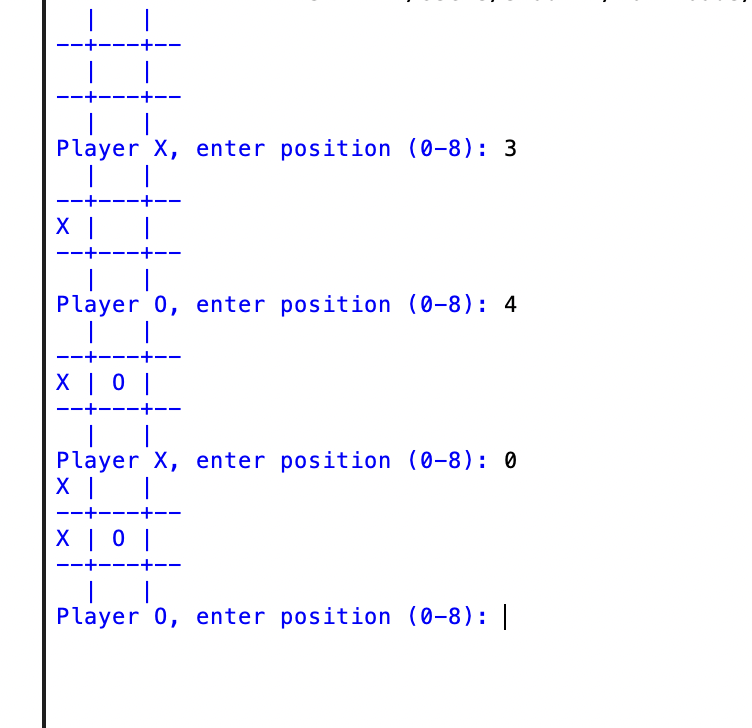
This code uses list as board. Players input positions. Checks win.
board = [' ' for _ in range(9)]

def print_board():
    print(f"{board[0]} | {board[1]} | {board[2]}")
    print("--+---+--")
    print(f"{board[3]} | {board[4]} | {board[5]}")
    print("--+---+--")
    print(f"{board[6]} | {board[7]} | {board[8]}")

def check_win(player):
    wins = [(0,1,2),(3,4,5),(6,7,8),(0,3,6),(1,4,7),(2,5,8),(0,4,8),(2,4,6)]
    return any(board[a]==board[b]==board[c]==player for a,b,c in wins)

player = 'X'
while True:
    print_board()
    move = int(input(f"Player {player}, enter position (0-8): "))
    if board[move] == ' ':
        board[move] = player
        if check_win(player):
            print_board()
            print(f"Player {player} wins!")
            break
        player = 'O' if player == 'X' else 'X'
    else:
        print("Invalid move!")
Print_board shows grid. Check_win lists combos. Loop alternates turns. Input 0-8. Validates empty spot. I added India twist: rename players India vs Pakistan. Fun rivalry.
3. Quiz Game on Indian States
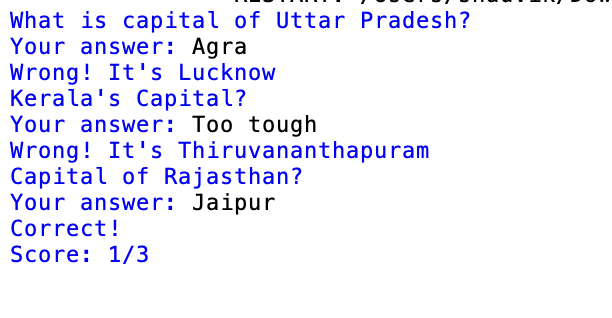
Quizzes build dictionaries, loops. Make it India-specific. Questions on capitals.
Code uses dict for questions. Counts score.
questions = {
    "What is capital of Uttar Pradesh?": "Lucknow",
    "Which state has Kerala?": "Thiruvananthapuram",
    "Capital of Rajasthan?": "Jaipur"
}

score = 0
for q, a in questions.items():
    print(q)
    ans = input("Your answer: ").strip()
    if ans.lower() == a.lower():
        print("Correct!")
        score += 1
    else:
        print(f"Wrong! It's {a}")

print(f"Score: {score}/{len(questions)}")
Dict holds Q&A. Loop asks each. Compares lowercase. I struggled with input case. Used lower(). Add more states.
4. Number Guessing Game
Random module introduces chance. Guess number 1-100.
Code picks secret. Limits attempts.
import random
secret = random.randint(1, 100)
attempts = 0
while attempts < 7:
    guess = int(input("Guess 1-100: "))
    attempts += 1
    if guess == secret:
        print(f"Correct in {attempts} tries!")
        break
    elif guess < secret:
        print("Too low!")
    else:
        print("Too high!")
else:
    print(f"Lost! Secret was {secret}")
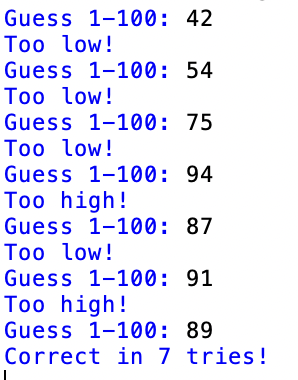
Random picks number. While loop limits 7 tries. Hints high/low. I fixed infinite loop by adding break. Twist: guess India’s independence year 1947.
5. Mad Libs Story Generator
Strings and input fun. Create funny India story.
Prompts for words. Fills template.
color = input("Enter a color: ")
city = input("Enter Indian city: ")
hero = input("Enter superhero: ")
print(f"In {city}, {hero} wore {color} cape. He fought villains with chai power!")

Simple inputs. Format string. Output story. Expand to full paragraph. I laughed at outputs. Good for English class.
6. Rock Paper Scissors
Conditions masterclass. Play vs computer.
Random choice computer. Compare.
import random

choices = ["rock", "paper", "scissors"]

while True:
    computer = random.choice(choices)
    user = input("Rock, paper, scissors? ").strip().lower()

    if user not in choices:
        print("Invalid choice. Please type rock, paper or scissors.")
        continue

    print("Computer chose:", computer)

    if user == computer:
        print("Tie! Play again.\n")
        # loop continues automatically
    elif (user == "rock" and computer == "scissors") or \
         (user == "paper" and computer == "rock") or \
         (user == "scissors" and computer == "paper"):
        print("You win!")
        break        # game ends here
    else:
        print("Computer wins!")
        break        # game ends here
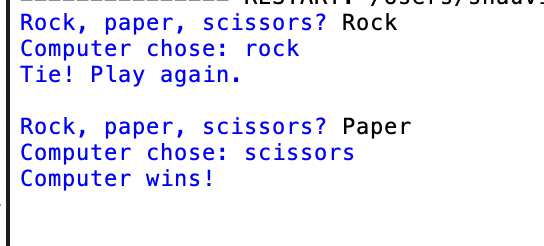
List choices. Or conditions win. Twist: add lizard spock? No, keep simple.
7. Simple Calculator
Functions and operators. Basic math tool.
Input expression. Eval safe way.
def calculator():
    num1 = float(input("First number: "))
    op = input("Operator (+,-,*,/): ")
    num2 = float(input("Second number: "))
    if op == '+': print(num1 + num2)
    elif op == '-': print(num1 - num2)
    elif op == '*': print(num1 * num2)
    elif op == '/':
        if num2 != 0: print(num1 / num2)
        else: print("Error!")
    else: print("Invalid!")

calculator()
If-elif handles ops. Check divide zero. I added loop for multiple calcs.
8. Fibonacci Sequence Generator
Loops and math. CBSE favorite.
Print first 10 numbers.
a, b = 0, 1
for _ in range(10):
    print(a, end=' ')
    a, b = b, a + b
Swap vars efficient. No recursion. Twist: relate to nature in India.
9. Prime Number Checker
Math logic. Check if prime.
Loop to sqrt(n).
num = int(input("Number: "))
if num > 1:
    for i in range(2, int(num**0.5) + 1):
        if num % i == 0:
            print("Not prime")
            break
    else:
        print("Prime")
else:
    print("Not prime")
Range to sqrt optimizes. Else on for loop. Good puzzle.
10. Password Generator
Strings and random. Security intro.
Generate strong password.
import random
import string
length = int(input("Length: "))
chars = string.ascii_letters + string.digits + string.punctuation
password = ''.join(random.choice(chars) for _ in range(length))
print("Password:", password)
Join random chars. Import string. Twist: for Indian apps.
These projects took me from zero to confident. Start one daily. Debug patiently. Share your versions.
Image Credits
All images in this article are AI-generated using Google Gemini and crafted with prompts by Perplexity Pro LLM.
Conclusion
Follow me on Medium, X, and LinkedIn for more practical guides and deep dives into Python, AI, and SEO. I share fresh tips every week that can save you time and boost your results.
Got questions or ideas? Drop a comment – I love hearing from readers and sharing insights.
And don’t forget to share this post with your network if you think it’ll help them too!
FAQs
Which Python project is best for Class 10 CBSE students?
Indian Flag (Turtle) and Quiz Game are easiest and scoring-friendly.
Are these projects part of the CBSE syllabus?
Yes, they cover loops, conditions, functions, and logic used in Class 10.
Can beginners build these Python projects?
Yes, all projects are beginner-friendly and explained step by step.
Do I need to install Python to run these projects?
You can use IDLE, Thonny, or even Google Colab online.
