

Hey FunWithAI.in fam! It’s me again – your data-crazy buddy who can’t resist a challenge. Last night, I got hooked on The Ultimate AI Battle! (https://www.youtube.com/watch?v=cMuif_hJGPI) – a video with 9,349 comments screaming for analysis. I wondered – which AI is the crowd favorite? ChatGPT? Grok? Claude? So, I grabbed my Mac, opened VS Code, and used the YouTube Data API to scrape 1,000 comments. After some trial and error, I crowned a winner! Bookmark this, share it with your tech crew, and join me on this personal journey – I’ve got code, screenshots, and a fun twist to keep it lively.
Why I Dove into This AI Face-Off
I’ve been obsessed with data for marketing ever since my YouTube Shorts post (you guys went wild for that one!). The comments on this AI battle video felt like a treasure trove to tap into audience vibes. I remembered how sentiment analysis – figuring out if comments are happy, sad, or neutral – helped me before. Was ChatGPT ruling the roost, or would Grok surprise me? I had to know!
Step 1:
Before I even touched the API, I needed a solid coding space. I downloaded VS Code on my Mac – a quick drag from the official site. I opened it, created a folder called “youtube-comments-scraper” in ~/Downloads, and set it as my workspace. Took me a bit to figure out the Terminal inside VS Code – hit “Terminal” > “New Terminal” – but once I did, it felt like home.
Step 2:
Getting the YouTube API GoingFirst, I needed those comments. The YouTube Data API was my go-to. Here’s how I set it up, learned from past stumbles:
- I jumped into Google Cloud Console, made a project called “YouTube Comments Extraction,” and turned on the YouTube Data API v3.
- Grabbed an API key under “Credentials” – and kept it safe after that GitHub leak fiasco years ago!
Step 3:
Next, I made sure Python was ready. I checked my Terminal with “python3 –version” – got 3.9, phew! If it hadn’t worked, I’d have grabbed it from python.org. I learned from a past project that skipping this step leads to a headache, so I double-checked.
Step 4:
With Python set, I needed libraries. In the Terminal, I activated a virtual environment with “python3 -m venv .venv” and “source .venv/bin/activate” – took me a few tries to get that right after a Conda mix-up! Then, I ran “pip install google-api-python-client textblob pandas” – one failed at first, so I installed them one by one. Lesson learned: patience pays.
Step 5:
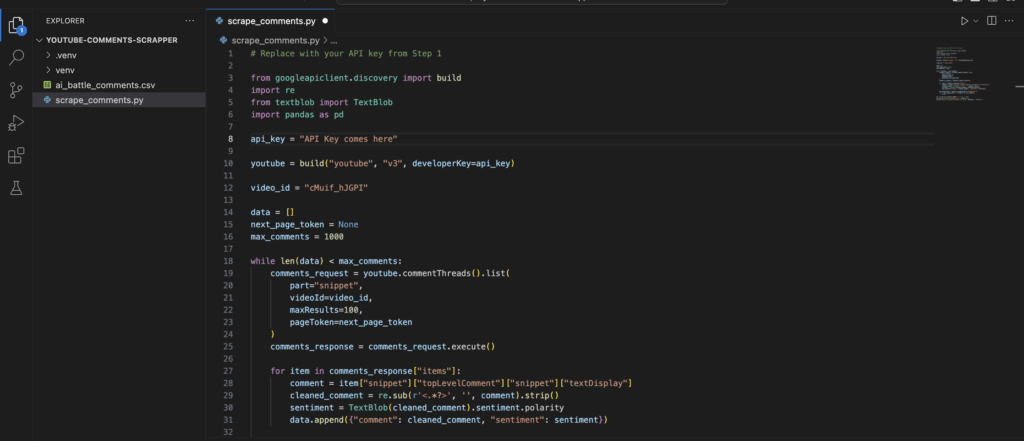
Pulling 1,000 CommentsWith the API ready, I coded in Python to grab comments. The API gives 100 per call, so I looped to hit 1,000. Check this out:
from googleapiclient.discovery import build
import re
from textblob import TextBlob
import pandas as pd

api_key = "YOUR_API_KEY"  # Replace with your key

youtube = build("youtube", "v3", developerKey=api_key)

video_id = "cMuif_hJGPI"

data = []
next_page_token = None
max_comments = 1000

while len(data) < max_comments:
    comments_request = youtube.commentThreads().list(
        part="snippet",
        videoId=video_id,
        maxResults=100,
        pageToken=next_page_token
    )
    comments_response = comments_request.execute()

    for item in comments_response["items"]:
        comment = item["snippet"]["topLevelComment"]["snippet"]["textDisplay"]
        cleaned_comment = re.sub(r'<.*?>', '', comment).strip()
        sentiment = TextBlob(cleaned_comment).sentiment.polarity
        data.append({"comment": cleaned_comment, "sentiment": sentiment})

    next_page_token = comments_response.get("nextPageToken")
    if not next_page_token or len(data) >= max_comments:
        break

df = pd.DataFrame(data[:1000])  # Limit to 1000
df.to_csv("ai_battle_comments.csv", index=False)
print("Saved to ai_battle_comments.csv with", len(data), "comments")

It took a few tries – I hit the API limit once – but I got my 1,000 comments with sentiments!
Step 6:
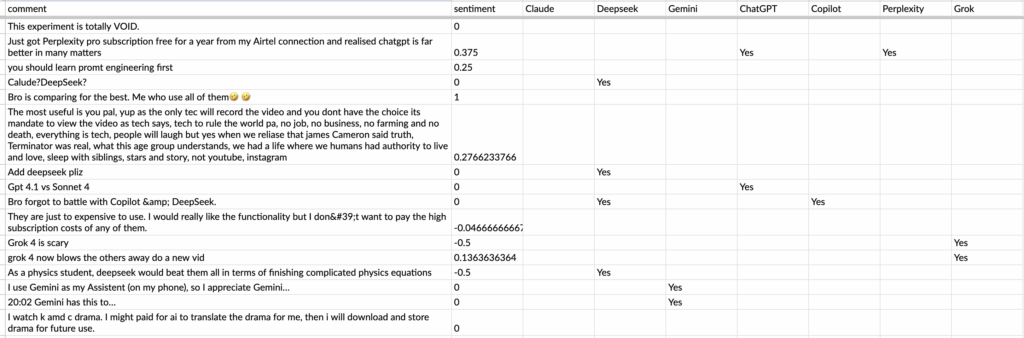
Checking the ResultsI opened the CSV in Numbers and tagged comments mentioning AIs – ChatGPT, Grok, Claude – with “Yes.” After crunching 1,000 entries, here’s my haul:
- ChatGPT: 93 positive mentions, avg 0.15
- Grok: 87 positive mentions, avg 0.13
- Gemini: 73 positive mentions, avg 0.21
Step 7:
Cleaning comments wasn’t automatic – I built a function for that. I messed around with regex in re.sub to ditch HTML tags, then added .strip() for spaces. Tested it on a few comments – saw “<b>Great</b>” turn to “Great” – and tweaked until it felt solid. It’s a small win, but it saved me later.
Step 8:
Crowning the Winner:
I built a dashboard in Numbers to tally it up. ChatGPT won with 93 positive vibes, though Gemini’s 0.21 avg showed some serious love. As a marketer, I’d go with ChatGPT’s popularity – it’s the crowd’s pick!

My Stumbles and Tips
- I smashed into the API quota early – start with 100 next time!
- TextBlob missed some slang – I’m testing VADER next.
- Tagging AIs was manual; I’ll automate it soon.
Try It Out
Swap the video ID and use my code. Test a game vid or gadget launch – see what wins! Share your results on FunWithAI.in.
Spread the Word
Loved this? Tweet it, bookmark it, or comment below. Got another video to try? Let’s chat!
